Unagui Save Cart for WooCommerce Pro

Turn Saved Carts into Completed Orders with Powerful Sharing & Admin Insights.
Unagui Save Cart for WooCommerce Pro is the ultimate tool for collaborative shopping, future purchases, and deep store management. It transforms a simple utility into a robust system that ensures customers can always pick up where they left off, or invite others to purchase for them.

Backed by our 30-Day Risk-Free Money-Back Guarantee

Core Features

Available in the free and pro version of the plugin

Unlimited Cart Saving

Logged-in users can name and save as many shopping sessions as they want.

Centralized "My Account" Management

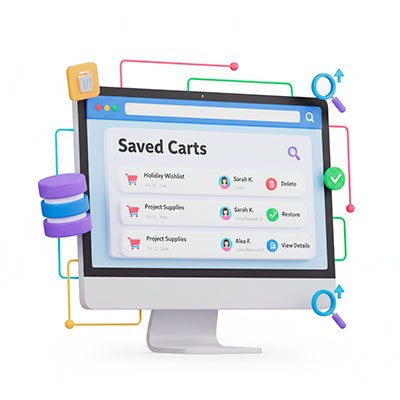
Customers can easily access, view, and delete their saved carts from a dedicated area in their user profile.

One-Click Restoration

Customers can instantly restore any saved session into a fresh cart for a seamless checkout experience.

Native Integration

The Save Cart form is automatically added to the default WooCommerce Cart page and is also available as a standard Gutenberg Block for placement in block-enabled areas.

Exclusive Pro Features

Turn Intent into Revenue. The Pro version takes your store to the next level by actively converting saved carts into paid orders.

Automated Sales Recovery

Don’t wait for customers to remember you. Go get them!

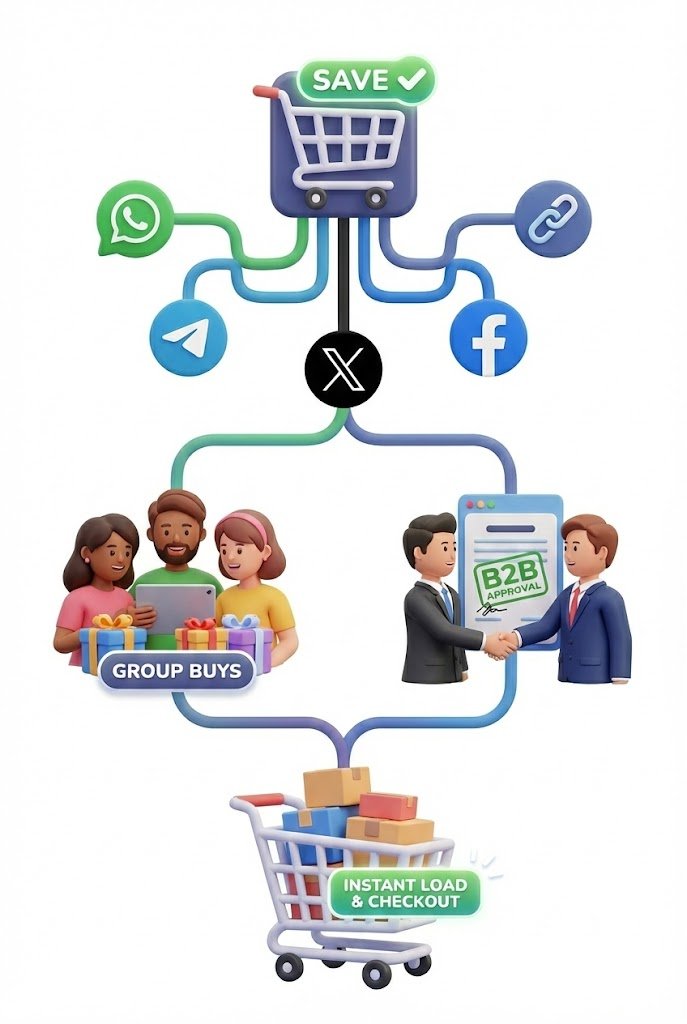
Seamless Cart Sharing for Group Buys & Approvals

Unlock collaborative and communal shopping experiences by enabling instant cart sharing. This feature is perfect for B2B approvals, gift-giving, or “Shop with Friends” experiences.

Integration Flexibility & Page Builder Support

Take full control over where and how the cart saving functionality appears on your site. The Pro version allows for dynamic placement to match any custom layout or page builder design.

Comprehensive Saved Cart Management for Store Admins

Gain complete control and visibility over every shopping intention saved by your customers. The Pro version provides a critical management tool in your WordPress dashboard.

Free vs. Pro

Feature
Free
Pro
Unlimited Cart Saving & Restoration
Customer Cart Management (My Account)
"Save Cart" Form Default Placement (Cart Page)
Gutenberg Block / Widget
Email Automation & Reminders NEW
Dynamic Coupon Generator NEW
Cart Sharing Functionality
Elementor Widget & Shortcode
Admin Control Over Sharing Channels
Admin Saved Cart Tracking & Insights
Admin Management of Saved Carts
Priority Customer Support

⭐ What Our Pro Users Say

100% Risk-Free: Our 30-Day Guarantee

We believe Unagui Save Cart for WooCommerce Pro will pay for itself with the very first sales you recover. If for any reason you aren’t satisfied within the first 30 days, we will refund your purchase in full. No questions asked.

Frequently Asked Questions

Is the Free version required?

Yes. Unagui Save Cart for WooCommerce Pro is a powerful extension that requires the Free version to be installed and active.

The purchase of an Unagui Save Cart for WooCommerce Pro license is an annual subscription that includes:

  • Full access to all Pro features (Email Automation, Sharing Tools, Admin Tracking & Insights, Elementor Widget, Shortcode).
  • One year of Priority Customer Support from the Unagui development team.
  • One year of Plugin Updates, ensuring compatibility with the latest versions of WordPress, WooCommerce, and Elementor.

Your license is valid for one (1) live production website only.

Additionally, you are permitted to activate the same license key on one (1) non-production testing environment (staging, development, or local host) associated with your main live site. This allows you to safely test updates and customizations before deploying them live.

If you cancel your annual subscription, the Pro features will continue to work until the end of your paid license period. After the expiration date:

  • The Pro features (Sharing, Admin Tracking, Elementor Widget) will remain active.
  • The core functionality of the Free version will remain active.
  • You will no longer receive software updates, new features or technical support.

While the Free version provides the essential functionality for customers to manually save and restore their shopping sessions, the Pro version is a complete Sales Recovery Engine designed to grow your revenue automatically.

The Pro version adds high-conversion tools including:

  • Automated Email Recovery: Don’t wait for customers to come back. Automatically send scheduled email reminders to users with saved carts to bring them back to your store.
  • Dynamic Coupon Generation: Attach unique, time-sensitive discount codes (Percentage or Fixed) to your recovery emails to incentivize immediate purchases.
  • Viral Cart Sharing: Allow customers to share their exact cart selection via WhatsApp, Telegram, Facebook, X (Twitter), or a direct link—perfect for B2B approvals and social shopping.
  • Admin Tracking & Insights: Gain full visibility into customer intent. See exactly who is saving what, how often carts are restored and purchased, and manage all saved sessions from your dashboard.
  • Advanced Design Integration: Gain total control over your layout with our dedicated Elementor Widget and universal Shortcodes.

In short: The Free version organizes your store; the Pro version sells for you.

See the comparison table above for a full breakdown of all features.

Yes. Users can save multiple different shopping sessions. When saving, they can assign a unique name to each cart, and then view and manage all their saved sessions from the dedicated “Saved Carts” section in their ‘My Account’ page.

Coupons create a sense of urgency. By sending a limited-time discount (e.g., “Finish your order in 24 hours and get 10% off”), you significantly increase the chances of conversion.

Yes, this is a core Pro feature. Any logged-in user can share their saved or active cart with anyone else (even non-users) by utilizing the various sharing options you, the admin, have enabled (WhatsApp, Telegram, X, Facebook, or a direct link). The recipient clicks the link and instantly loads the cart contents.

Yes, absolutely. You have extensive control over the form’s text and style:

  • Text Customization: The admin panel allows you to easily change the Title, Placeholder text, and Button Label of the Save Cart form, ensuring clear communication with your customers.
  • Style Customization (Advanced): Every element within the Save Cart form is tagged with specific CSS classes. This allows developers and designers to achieve total style coherence with your theme using custom CSS.
  • Elementor Integration: If using the Pro version’s Elementor Widget, you gain access to all of Elementor’s native advanced styling tools, giving you pixel-perfect control over the form’s appearance without needing custom code.

When a customer uses the sharing function, the plugin generates a unique, encrypted link that contains the exact contents of their cart. When another user clicks this link, the items are automatically loaded into their own shopping cart, ready for immediate purchase.

The most common reason for this issue is that the Free version of the plugin is not installed or active.

The Pro version, Unagui Save Cart For WooCommerce Pro, is built as an extension to the free version, Unagui Save Cart For WooCommerce. It relies on the free version for all core functionality and infrastructure.

Please check the following in your WordPress dashboard:

  • Is the Free Plugin installed? You must have Unagui Save Cart For WooCommerce listed under Plugins > Installed Plugins.
  • Is the Free Plugin active? Ensure the free version is running before attempting to activate the Pro version.


Once the base plugin is active, you should be able to activate the Pro version without any trouble.

Stop Leaving Money on the Table

The Free version is a great starting point, but to truly maximize your store’s efficiency and maximize your profits, you need the Pro power.

Start recovering lost sales today with the most complete cart management tool for WooCommerce.